Changelog

New features, Chrome UX Report data releases and Lighthouse changes in Treo, the Core Web Vitals monitoring tool.

Follow Treo on X and LinkedIn for the latest updates.

  • Research
  • CrUX

The soft navigations report

Who uses soft navigations, and how do Core Web Vitals change with them? The soft navigations report answers for the top 10,000 sites in the Chrome UX Report.

Most sites have some soft navigations, few rely on them: for one site in ten, more than half of the navigations are soft. For those sites, the share that pass Core Web Vitals more than doubles once soft navigations are counted, from 16.7% to 40.7%. LCP gains the most, INP the least: most of the sites that still fail are not good on INP. Soft navigations are most common in Europe.
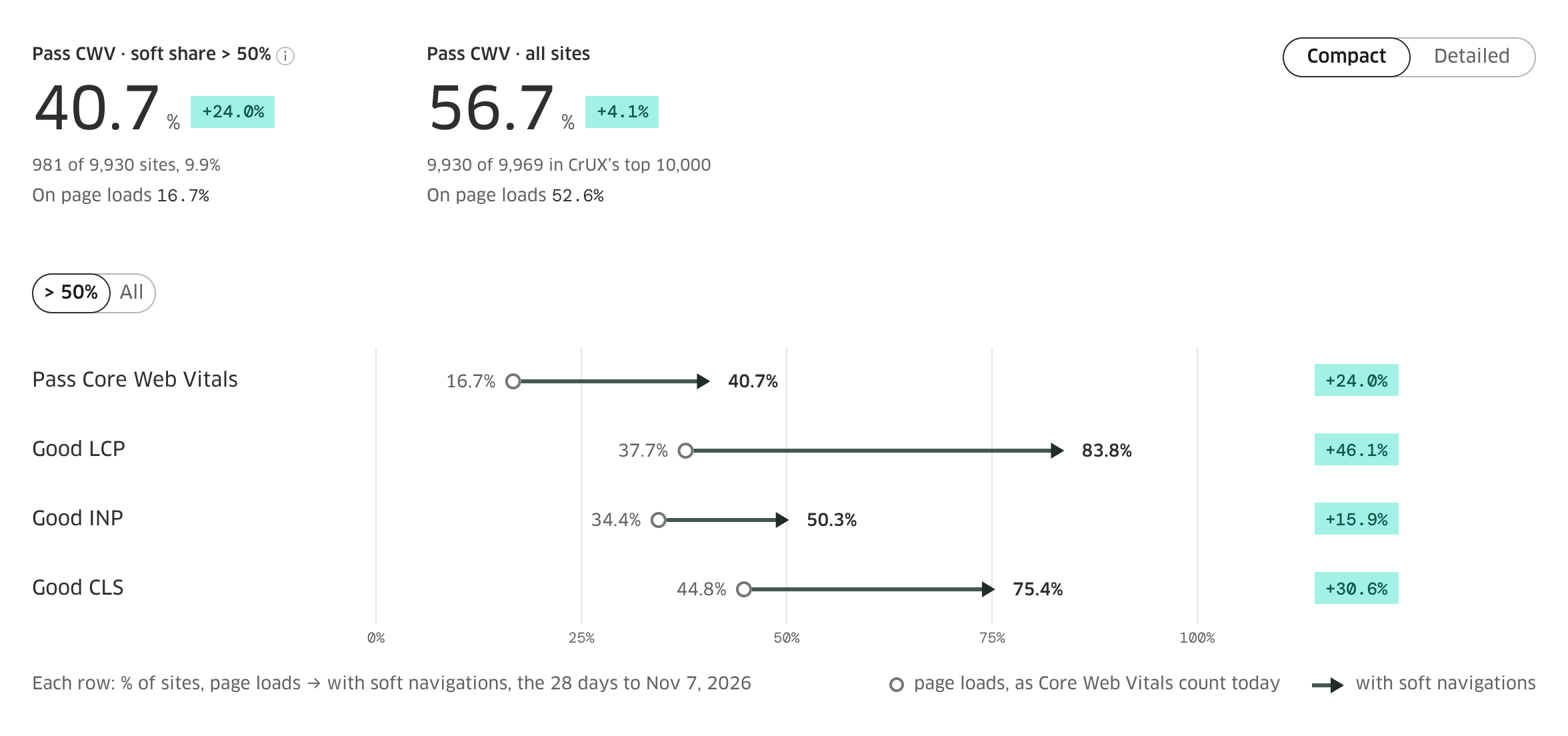
For sites whose navigations are more than half soft: the share that pass Core Web Vitals and are good on LCP, INP and CLS, on page loads and with soft navigations

  • New feature
  • CrUX 202610

Soft FCP, soft navigation types and October's data

On November 10th the Chrome UX Report added two experimental metrics to its API: First Contentful Paint with soft navigations, and the navigation types with an eighth type, soft navigations. Their history starts with the week ending November 7th.

Treo shows both under the Soft navs switch: the FCP card draws FCP with soft navigations, and the Audience block shows the share of soft navigations. They are on the site and url reports, in the Pages table and in My Sites.

What they show

discord.com is a single-page app: 89.5% of its navigations are soft, and its FCP falls from 5.6 s to 0.6 s once they count. On www.booking.com 38.2% of navigations are soft, on en.wikipedia.org 11.6%, on www.gov.uk 0.07%, all in the week ending November 7th.

October's CrUX data

CrUX's October 2026 release is in Treo: the Detailed report, the Sites list and the map show it. The two new soft metrics come to these monthly views with a later release.

  • Lighthouse

Lighthouse 13.6.0 with better metrics for SPAs

Treo's scheduled tests moved from Lighthouse 13.4.1 to 13.6.0 on November 6th. A "Lighthouse 13.6.0" note marks the step on your charts.

What moves on your charts

The largest change is in simulated throttling. Lighthouse now takes render-blocking from Chrome's own data (#16869), so preloads and fonts that do not block rendering no longer hold back FCP, and a text LCP painted in the same frame as FCP now equals it. Single-page apps with preloads gain the most, as Framer shows on its sites.

On mobile pages FCP and LCP fall and most scores rise, while TBT rises a little. Desktop moves little.

Pages tested through PageSpeed Insights follow Google's own move to 13.6.0, on Google's date.

Clearer failures

A failed run now says what happened: "The page crashed the browser tab", "The page stopped responding", "Chrome closed during the run" or "Lighthouse could not record the trace". A crashed tab or a page that stops responding counts toward the three failures in a row that pause a page, and the other two do not.

  • New feature
  • CrUX 202609

Core Web Vitals with soft navigations

A single-page app changes the page without a full load, and Core Web Vitals have not counted those navigations. Since its September 2026 release, the Chrome UX Report publishes experimental LCP, INP and CLS that do. Google aims to count them in Core Web Vitals in May 2027, subject to feedback.

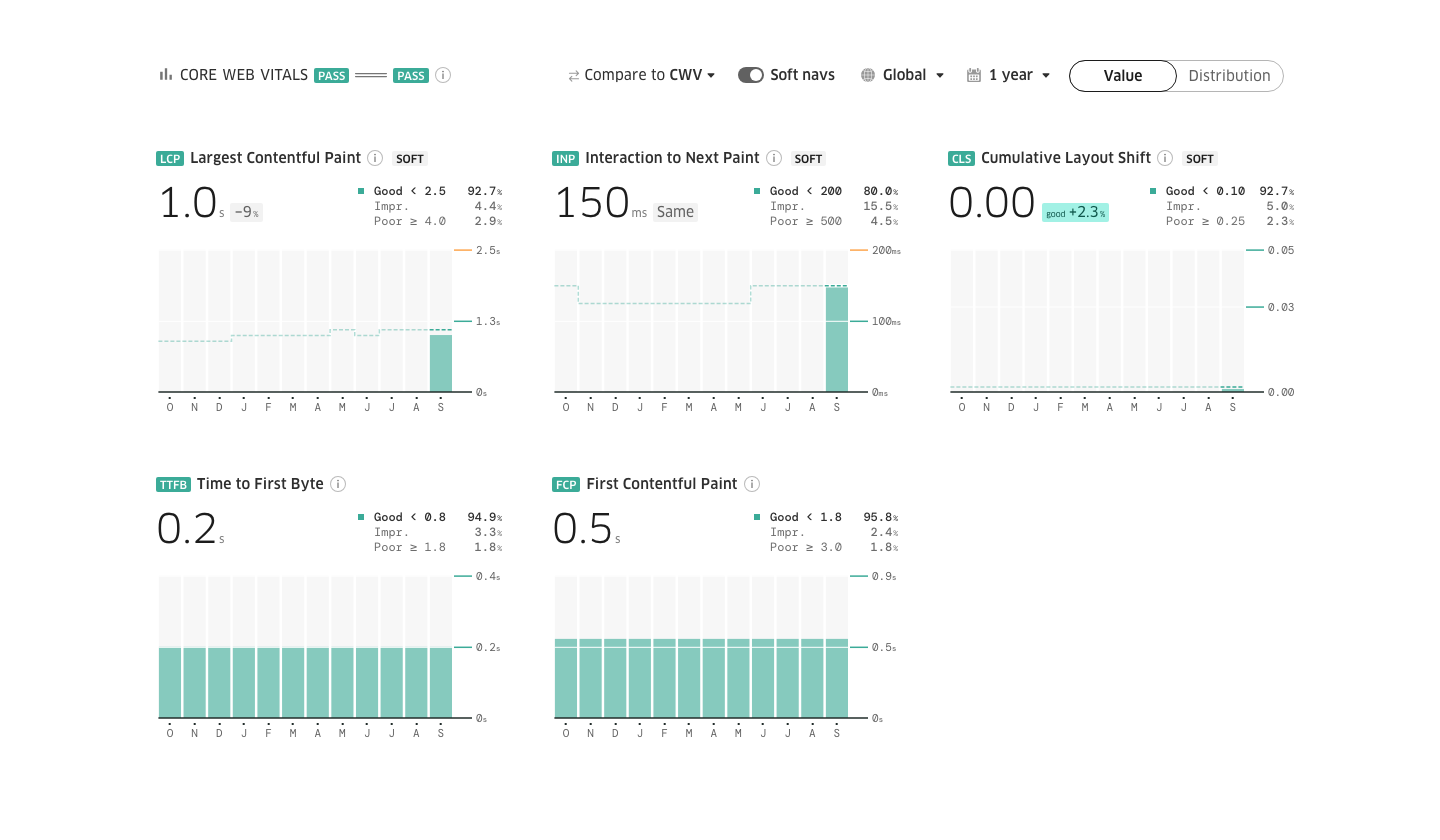
Treo shows them today. Turn on Soft navs in a report to read every metric with soft navigations, or set Compare to CWV to see what they change beside the values you know. It works in the site report and its country map, in the Pages table, on the url and page reports, in My Sites and the Sites list, and in the free report.

The Core Web Vitals section of a site report with Soft navs on and Compare set to CWV

See any site's Core Web Vitals from Chrome users

Type a domain to open its free report.